Web Fetch
Transcribe M3U8 streams and web videos on your Mac
Scriber Pro 2.0 · Updated October 17, 2026
Scriber Pro's Web Fetch takes the link to a web page, finds the videos on it, including the M3U8 (HLS) streams behind the video player, and transcribes the one you pick. It works on pages you have to sign in to, like a Canvas course or a company video portal. The transcription itself runs on your Mac.
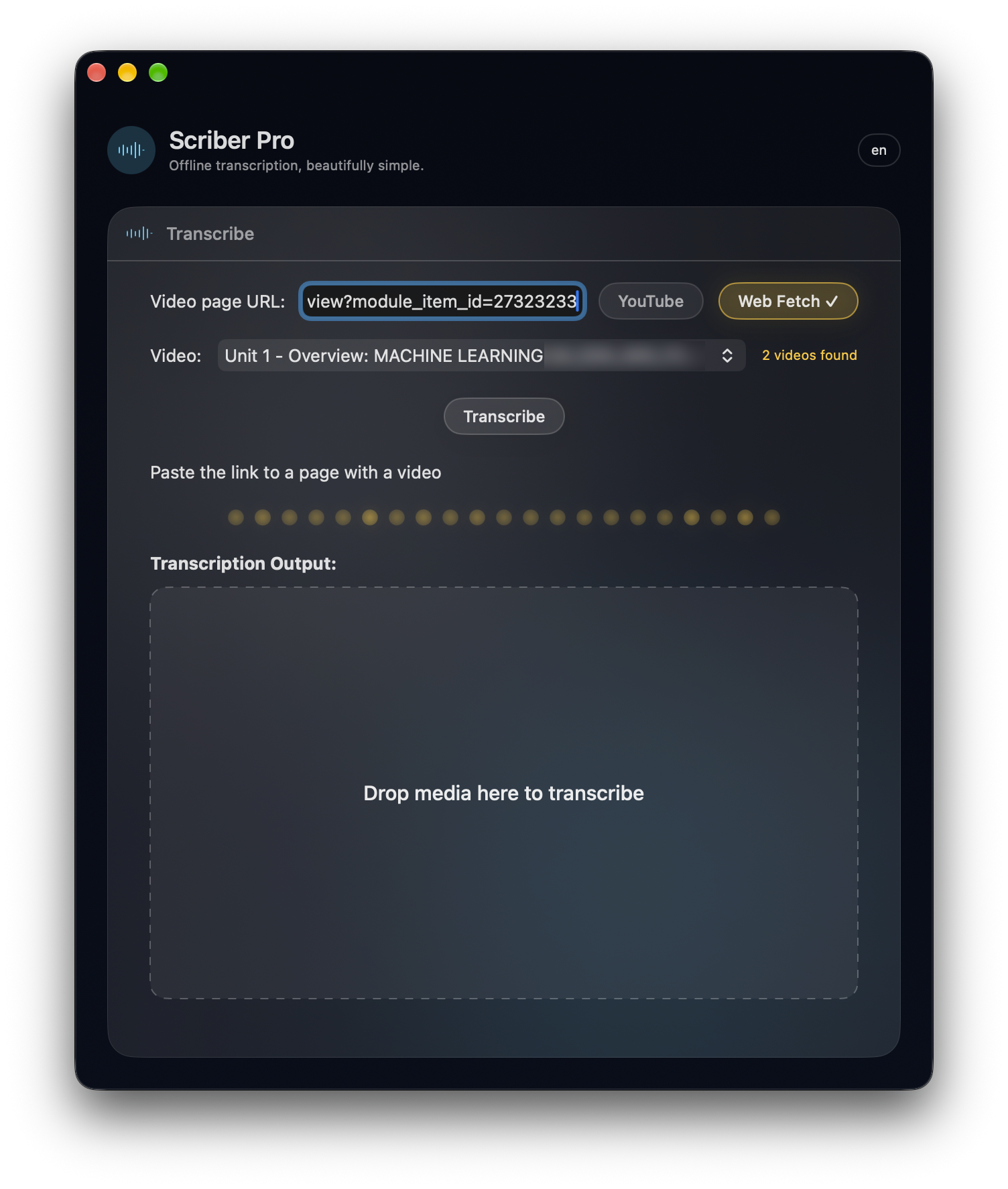
Paste the page link, pick the video it found, click Transcribe.
How it works
- Click Web Fetch and paste the link to the page with the video, or a direct .m3u8 link.
- Click Find Videos. If the page needs a sign-in, sign in once in the window Scriber opens. Pick the video from the list, which shows each one's title, length and quality.
- Click Transcribe. Scriber fetches the lightest version of the stream, keeps only the audio, transcribes it on your Mac and saves the transcript to your library.
What it replaces
Without Web Fetch, transcribing a web video means opening the browser's developer tools, finding the .m3u8 link in the network tab, downloading it with yt-dlp or ffmpeg (with the right cookies if the page needs a login), and then dragging the file into a transcription app. Web Fetch does all of that in one step, in one app, with no browser extension.
What makes it different
- Built into a Mac app, not a browser extension: nothing to install in Chrome or Safari, nothing that breaks when the browser updates, and the transcript lands in Scriber's library with everything else.
- It starts from the page: most transcription apps need a file or a YouTube link. Web Fetch takes the page itself, finds the M3U8 (HLS) streams behind the video player and lets you pick the video from a list.
- It signs in the way you do: on pages behind a login you sign in once, in the site's own window. No copying cookies or tokens into a command line.
- It doesn't record in real time: capturing a video's sound while it plays takes as long as the video. Web Fetch fetches the stream directly, so an 11-minute lecture took 47 seconds from pasted link to finished transcript.
The facts
- Local transcription, no cloud: Scriber Pro transcribes on your Mac with Whisper (whisper.cpp). There is no transcription server and no cloud API.
- What goes online: only what you ask for. Web Fetch connects to the site you paste, to load the page and fetch the video's audio. The audio is transcribed and then deleted.
- Speed: in our test, an 11-minute lecture behind a university Canvas sign-in went from pasted link to finished transcript in 47 seconds, including fetching the stream (about 14× real time). Speed depends on your Mac and your connection.
- Sign-ins: when a page needs a login, Scriber opens the site's own sign-in window. Your sign-in stays on your Mac and is never sent to us.
- Tested with: Canvas, Kaltura, Vimeo, Apple event and developer videos, TED and the Internet Archive.
- Not supported: copy-protected (DRM) videos and live streams.
- Requirements: macOS 15.6 or later. A one-time $3.99 purchase on the Mac App Store, no subscription.
Questions
Does Scriber Pro transcribe in the cloud?
No. Scriber Pro transcribes on your Mac with Whisper (whisper.cpp). It has no transcription server and no cloud API. Web Fetch only connects to the site you paste, to load the page and fetch the video's audio.
How fast is Web Fetch?
In our test, an 11-minute lecture (11:09) behind a university Canvas sign-in went from pasted link to finished transcript in 47 seconds, including fetching the stream. That is about 14 times faster than real time. Speed depends on your Mac and your connection.
How is Web Fetch different from a browser extension or yt-dlp?
Web Fetch is built into the Scriber Pro Mac app. It starts from the web page, finds the video's M3U8 (HLS) stream itself, handles sign-ins in the site's own window and fetches the stream directly instead of recording it while it plays. There is nothing to install in the browser and no command line, and the transcript is saved to Scriber's library.
Do I need a browser extension, developer tools or yt-dlp?
No. Scriber Pro is a standalone Mac app. You paste the page link; Scriber finds the stream, fetches it and transcribes it. There is no need to find the .m3u8 link in the browser's network tab or download it with yt-dlp or ffmpeg first.
Can Scriber Pro transcribe videos behind a login, like Canvas or Kaltura?
Yes. When a page needs a sign-in, Scriber opens the site's own sign-in window. You sign in once and Scriber remembers it on your Mac.
What can't Web Fetch transcribe?
Copy-protected (DRM) videos and live streams. Some players only load their video on the video's own page, so paste that page's link, or a direct video link.
Also in Scriber Pro 2.0
- YouTube transcripts: paste a YouTube link and get the video's transcript (for videos with captions).
- Batch transcription: drop in a whole stack of audio and video files and Scriber works through them one by one.
- Library: every transcript is saved to a searchable library with categories and favorites, synced through your own iCloud.
- Export: TXT, RTF, Markdown, PDF, DOCX, SRT, VTT, JSON and CSV.
Questions or a site that doesn't work: [email protected] | Show HN discussion | Support | Main Site